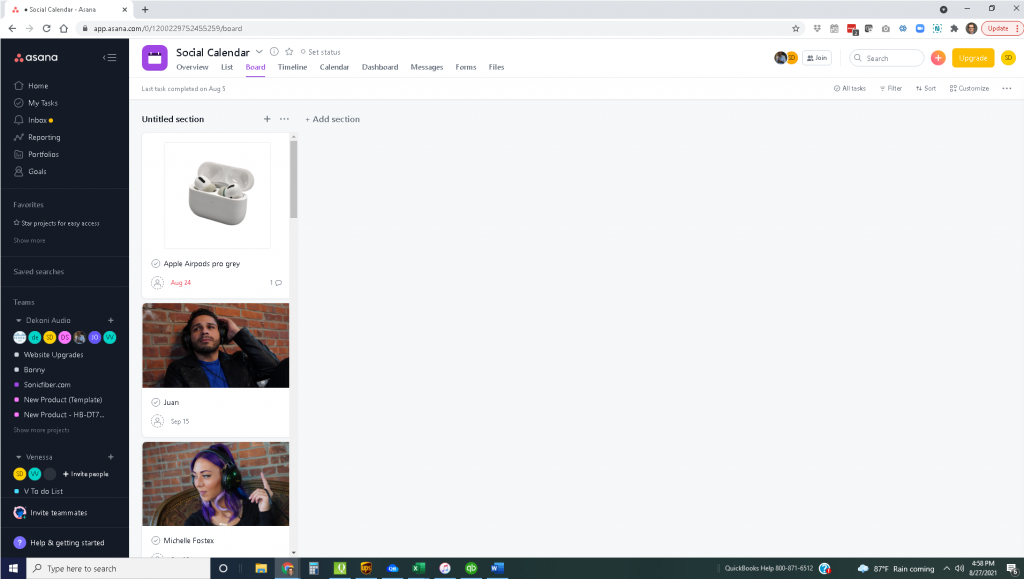
Last week’s blog post focused on Trello, which is the platform I most often use for task-oriented assignments related to project management and workflow. The team in my music businesses generally uses a different tool (Asana) that I was originally introduced to through G Suite. I have explored quite a few free project management tools over the years, and although I tend to rely on Trello, I have found that Asana is one of the best at handling management tasks.
As a reminder, I do not receive any compensation for the products or services I discuss in this week’s blog post. They are simply tools I use in my own businesses. I am not looking for any clients or sponsorships at this time. I simply want to share some of the knowledge I’ve acquired in my professional career in hopes that in doing so, I can enrich and grow the businesses of other entrepreneurs.
Trello and Asana share some similar characteristics, including some key functionality. Like Trello, for example, Asana offers users different boards that can be shared by either individual teams or individual team members. These boards are similar to the boards in Trello because they can also contain lists and cards of work-in-progress tasks. In addition, Asana has good integration with Slack, which is terrific news for those companies using Slack either as a communication tool or as a home base for all of their other integrated apps. (Because we use Slack integrations with calendar, live chat, social media chat, and also many other tools, we use Asana in this fashion as well.) The Asana boards can show up in one of several different modes: Overview, List, Board, or Calendar. (See the screen shots at the end of this week’s blog post for samples of each mode.) Asana offers two more advanced formats—timeline and dashboard mode—that we do not use because they require an additional subscription. As a result, I have not explored these formats, although some of the literature reports that the timeline mode is particularly useful for project management/timeline planning.
The key functionality of Asana allows users to break jobs down into individual tasks that need to be completed in a certain sequence. There’s a sense in which this tool employs the same kind of system that the automobile industry has adopted—namely, an assembly-line approach that relies on the completion of a series of individual tasks to build an end product. My team likes Asana because it provides an easy way to assign tasks to specific people as a project or card advances over time. (As mentioned last week in the blog post on Trello, cards, which are a typical feature of these project management tools, are assigned to specific individuals who will be working on a project. (Cards also serve as a tracking device because they can migrate from list to list as a job advances from first step to last.) This feature allows users to move from one list to the next and assign due dates right on a card. Users can also use cards to communicate with one another. Another virtue of the system: It triggers notifications in Slack. As a result, you don’t have to constantly check any one board or list in Asana, and you also don’t have to check your emails for notifications because the system automatically provides email notifications.
Asana provides one of the best applications I’ve seen for creating a social media posting calendar.
Our creative team finds this task to be one of the most time-consuming and thought-intensive efforts we have to deal with in the course of doing business. The process typically begins with our social media coordinator and brand managers brainstorming together to address some important questions, questions whose answers will shape our business plan going forward: What products do we want to feature? What contests and video releases are coming up in the near future? What new products are being introduced to the market? In the course of a typical month, we might also need to consider the reposting of relevant topics that originated on Instagram and Facebook feeds of related industry professionals or brands. Each post gets a card that is tagged with the projected posting date as well as a deadline for assets (e.g., visuals that will be included in the posting), and each team member is assigned a particular task. Once we’re up and running, the photo/video team adds images, the brand manager adds captions, and the social media coordinator ensures that the upcoming week’s content ready on time to ensure consistent postings for our end users to engage with. All team members can see the progress of the project up until the moment the completed job goes live. At that point, the social media coordinator responsible for posting the finished job marks it as complete. (This step is not done through Asana, but we do keep track of task completion there.) Once we began using Asana for this work, we found that it improved the process in two ways: It facilitated communication within our team, and we managed to get our content out faster and with fewer hiccoughs. Everyone now knows due dates, including the date on which the posting is scheduled to go live. Everyone can also identify the most recently completed step as well as who is responsible for creating the content at each stage.
Our team also uses Asana to assign to-do lists. In my opinion, Asana handles this task as well as Trello does. With Asana, each team member has a board of his or her own to-do list, which is broken up into the different types of tasks a job requires (website maintenance, customer service, projects, shipping/receiving, content creation, etc.). Team members add cards/tasks to their boards and can also move tasks from others’ to-do lists to their own. This is the simplest functionality of Asana, making it very good for communication and task completion. Everybody can also assign other team members specific tasks that require the efforts of more than one person. In addition, this feature enables users to establish due dates for those tasks that require the efforts of more than one person.
In our experience, Asana is also a great tool when trying to manage the most difficult workflows—that is, new product creation. You start with an initial problem or idea, and you develop a salable product. The process requires product designs, research, testing, prototyping, revisions, design approvals, more research, packaging design, bar coding, purchasing, receiving, website data input, photography, social/marketing release content, blog post/announcement release, reviewer coordination—and eventually, the full product release. Whew! The process typically requires input and task-completion efforts from just about every member of my team, including me. The work done by our outsourced vendors is also part of this tracking effort. In short, Asana allows us both to maintain a consistent workflow process, one that dictates the movement of every project, and also to hit all the checkboxes and steps along the way. The result? We have everything we need to get to the final product release date. This process constituted a significant improvement over our previous workflow efforts. (We previously used an Excel workbook with checkboxes that were marked off at the end of each step to signify the completion of individual tasks.)
If you don’t work with to-do lists in which all the vital information related to a project resides, it probably means you don’t know when projects are due. Asana can really help organize your workflow and ensure that everyone is aware of both what needs to be done at every stage of the process and also the timetable that lays out when steps need to be completed. Finally, it is an important tool when scheduling website or media content or if you have projects that you are working on with other team members, vendors, or consultants. Warning: It doesn’t make employees do the work any faster or better; it just makes sure they know what they have to do! And needless to say, knowing what you have to do to get the job done is always a good start!
Overview

Calendar

List

Board